Brat Meme Generator – Create Brat Style Memes Instantly
Most meme tools give you a text box and a white background and call it done. That works for basic memes but it does nothing for the brat aesthetic. The style needs the right colors, the right blur, the right energy and getting all of that manually across multiple apps wastes time most people do not have.
This Brat Meme Generator is built specifically for this. Six preset meme templates, multi-layer drag and drop text, photo upload with a lo-fi filter, and instant PNG download. Everything you need to make a brat style meme that actually looks right, in one place, completely free.
What Is Brat Meme Generator
Brat Meme Generator is a dedicated meme creation tool built around the visual aesthetic of Charli XCX’s brat era. It is a completely separate tool from the main Brat Generator which creates single line album cover images. This one is built as a full interactive canvas for making multi-layer, shareable memes.
The core difference is flexibility. You are not locked into one line of text on a flat background. You can add multiple text layers, drag them anywhere on the canvas, upload your own photo, apply a lo-fi filter that matches the raw club visual energy of the brat aesthetic, and choose from six culture-coded layout presets that are ready to use from the moment you open the tool.
How to Use Brat Meme Maker
Using bart meme generator is quite simple thing. We have shared the procedure below, follow these steps to create unique brat memes.
Choose your mode before creating. Pick a preset meme template from the six available options if you want to start fast. Or switch to photo mode if you want to upload your own image and build around it.
If you choose a preset template, your canvas loads instantly with the layout, colors, and default text already in place. Edit the text to say whatever you want.
If you choose photo mode, upload your image by dragging and dropping it or selecting it from your device. PNG and JPG files up to 10MB are supported. Then choose your layout, Aesthetic Overlay places blurry text over the center of the photo. Classic Top Bar adds a solid colored bar at the top with text and your photo underneath. Classic Bottom Bar flips that layout with the photo on top and the text bar below.
Add your text. Each text layer is independent. Click the Add button to create more layers, click any layer to select it, and drag it anywhere on the canvas. Every layer has its own font size slider from 12px to 80px and blur slider from 0 to 10px.
Style your canvas. Set background and text colors using the swatches or enter a custom hex code. Use the vertical position slider to control where the photo or text sits on the canvas.
Stuck on what to write? Hit the Idea button. It injects trending Gen-Z and brat slang phrases directly into your text layer so you never have to stare at a blank box.
Download your meme as a standard PNG at 1000×1000 or a high resolution PNG at 2000×2000 for crisp output on any screen or print format.
Then hit the generate button and watch the preview update in real time. You’ll see exactly what the final image looks like before you download it. If you want to change anything like text or color, just make the changes and the preview adjusts instantly.
If you want to go beyond text overlays and apply full brat style color treatments to your photo, this photo transformation tool is built specifically for that.
Six Preset Brat Meme Templates
These are not generic layouts. Each one is built around a specific brat era mood and is ready to use the moment you click it.
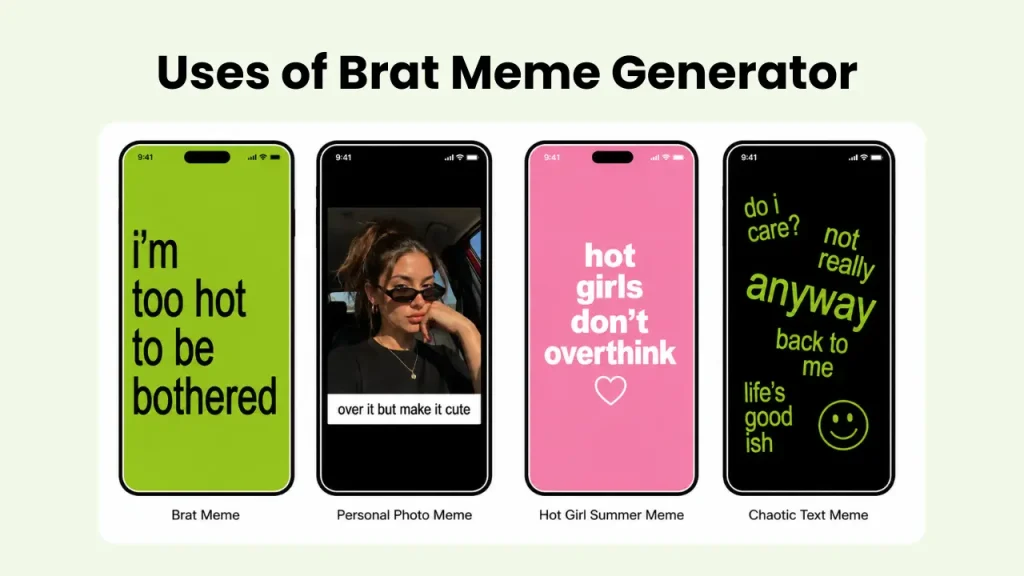
- Brat Summer Certified — the classic lime green background with bold lowercase text. The most recognizable brat aesthetic, instantly familiar to anyone who knows the album.
- That Girl Energy — dark background with light blurry text. Confident, moody, and clean. Works well for attitude-heavy captions and reaction memes.
- 3AM Thoughts — moody dark tones with blurred edges. Built for late night, introspective, or emotionally raw content that still looks visually intentional.
- Chaotic Good Era — angled and tilted text format. The layout itself adds energy before you even read the brat words. Best for chaotic, funny, or unpredictable meme content.
- Hot Girl Summer — vibrant pink background. Warm, fun, and high energy. Works especially well for summer content, birthday posts, and hype captions.
- Cult Classic — dark charcoal with neon green contrast. The most visually striking preset. Built for bold statements and content meant to stop someone mid-scroll.
Features
This tool was built as a full meme workstation, not a renamed cover generator. Here is what makes it different.
Multi Layer Canvas
You are not limited to one line of text. Click Add to create as many text layers as you need, select any layer individually, and drag and drop it anywhere on the canvas in real time. Each layer has its own size and blur controls completely independent from the others.
Photo Upload
Upload any PNG or JPG file up to 10MB and build your meme around your own image. Three layout options give you full control over how your photo and text sit together on the canvas.
Lo-Fi Filter
One toggle applies a high contrast deep saturated party aesthetic over any uploaded photo. Mobile photos often look too clean and bright for the brat style. This filter fixes that instantly and matches the raw visual energy of Charli XCX’s club era without any manual editing.
Idea Button
If you have nothing to write, hit this button. It pulls from a bank of trending Gen-Z phrases and brat era slang like “so 365 brat”, “living in a drama”, and “everything is romantic” and drops them straight into your text layer. One tap breaks the creative block.
Default 1px Blur
Every new text layer opens with 1px blur already applied. This is the detail that makes brat style text memes look authentic from the first second. You can adjust it up or down but the default is already right.
Custom Colors
Background and text color each have six preset swatches plus a custom hex input field. Match any specific shade for your aesthetic or brand without being limited to the defaults.
Preset Templates
Six culture coded layout presets load a complete canvas setup instantly. Colors, text position, blur level, and layout are all pre-configured so you can start editing immediately instead of building from scratch.
HD Export
Two download options are available. Standard PNG at 1000×1000 for social media and high resolution PNG at 2000×2000 for crisp output on desktop, presentations, or print.
What You Can Make With It
The most obvious use is social media memes. A brat style meme with the right phrase and the right template can stop someone mid-scroll without needing a complex design behind it. The text memes format works especially well on X, Instagram Stories, and TikTok because the style is already built for short punchy content.
Photo memes are the other big use case. Upload a personal photo, apply the lo-fi filter, drop a text overlay using the classic top or bottom bar layout, and the result looks like something that came out of a real party shoot rather than a browser tool.
Fan accounts use it constantly for reaction content, lyric edits, and brat summer certified posts. The preset templates make this fast enough to produce multiple pieces of content in one session.
The chaotic good era and 3am thoughts templates work well for relatable text memes that do not need a photo at all. Just the right phrase on the right background is enough.
If you want to go further with the visual, pair your meme with a custom image from the main Brat Generator or add styled text using the Brat Text Generator.
User Reviews About the Tool
Finally a Real Meme Tool Every other brat tool I tried was just a text box on a green background. This one actually lets you drag the text around and layer it. I used the 3am thoughts template for a reaction post and it got more engagement than anything I have made in months.

Lo-Fi Filter is Everything I uploaded a photo from a night out and it looked too clean and bright for the brat vibe. One click on the lo-fi filter and it looked completely different. Exactly the aesthetic I was going for. I have not used any other tool since.
Idea Button Saved Me I use this for my fan page and I run out of things to write constantly. The idea button is genuinely useful. It gave me “living in a drama” and I used it exactly as it was. The hot girl summer template with that phrase performed really well.
Multi Layer is the Real Win Being able to add multiple text layers and drag them wherever I want changes everything. I put a big blurry word in the background and a sharp smaller line in front of it and the result looked like something I spent an hour designing.




Conclusion
Most meme tools make you compromise on the aesthetic to get the convenience. This one gives you both. Six ready to use templates, drag and drop multi-layer text, photo upload with a lo-fi filter, and HD export, all free, all in one place. Whether you are making a reaction meme, a brat summer certified post, or a photo overlay for a late night story, this Brat Meme Generator gets it done without sending you to three different apps. Open it, make your meme, and post it.