Brat Generator Sticker – Create Brat Style Stickers Instantly
[brat_sticker_generator]
Most sticker tools give you a square image with a colored background and call it done. That is not a sticker, that is just a resized photo. If you want something that actually works as a sticker, you need a transparent background, a proper shape, and a format that drops cleanly over photos and videos without looking out of place.
That is exactly what this Brat Sticker Generator is built for. Type a short phrase or pick an icon, choose your shape, style it your way, and download a real sticker file in seconds. No account, no watermark, completely free.
What Is Brat Generator Sticker
Brat Generator Sticker is a dedicated sticker creation tool built around the brat aesthetic made famous by Charli XCX. It is separate from the main Brat Generator which creates square album cover images. This one is built specifically for sticker format visuals.
The core difference is shape and output. You pick from six sticker shapes, style your text or icon inside it, add a border or rotation if you want, and download a file that works as an actual sticker anywhere. Transparent background export means it drops cleanly over any photo, video, or chat without a background box getting in the way.
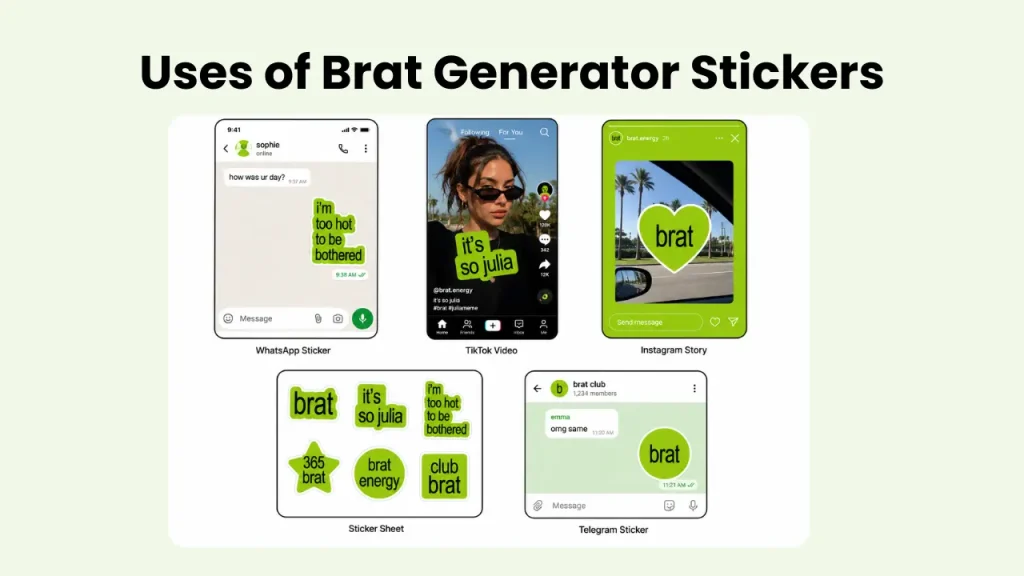
People use it for WhatsApp sticker packs, Telegram stickers, TikTok overlays, Instagram Stories, CapCut edits, and even physical print stickers. The brat text sticker style works across all of these formats because the aesthetic is bold enough to hold up at any size.
How to Use Brat Sticker Maker
Creating stickers with it takes barely 30 seconds. Follow these steps to create brat styled stickers.
Choose your sticker type. Pick Text Sticker if you want to type a short phrase up to 30 characters. Pick Icon Sticker if you want one of the 12 preset brat coded icons like a flame, crown, star, green heart, or lightning bolt.
If you chose Text Sticker, type your phrase into the input field. Keep it short and punchy. Examples like “brat”, “iconic”, “i don’t care”, or “that girl” work perfectly in this style.
Pick your sticker shape. Six options are available: Square, Rounded Square, Circle, Star, Heart, and Hexagon. Your content clips into the shape cleanly in the live preview.
Style your sticker. Choose background and text colors from the presets or enter a custom hex code. Adjust font size and blur level using the sliders. Toggle the white border on if you want the sticker to stand out when placed over dark backgrounds, then control the border thickness with the second slider that appears.
Rotate if needed. The rotation slider tilts your sticker from -30 to +30 degrees. The rotation is baked into the final file so what you see in the preview is exactly what you get.
Download your sticker. Three export options are available depending on how you plan to use it.
Download Options Explained
- Screen PNG exports at 1000×1080 pixels. Clean and sharp for social media posts, Instagram Stories, and TikTok overlays.
- Print PNG exports at 2400×2400 pixels at 300dpi. This prints as a clean 2×2 inch physical sticker. Works for home printing on sticker paper or sending to print services like Sticker Mule or Redbubble.
- Transparent Background PNG removes the background completely and exports only the sticker shape with its content. This is the most important format for digital sticker use. WhatsApp, Telegram, and iMessage all require transparent PNG files for custom sticker packs. CapCut and TikTok overlays also need this format to drop cleanly over video without a background box.
Features of Brat Sticker Generator
This tool was built to go further than a basic brat sticker maker. Here is what it actually gives you.
Two Sticker Types
You choose between a Text Sticker where you type any short phrase in brat style, or an Icon Sticker where you pick from 12 preset icons including flame, crown, star, green heart, lightning bolt, butterfly, and more. Both render inside your chosen shape with full styling control.
Six Shapes
Square, Rounded Square, Circle, Star, Heart, and Hexagon. Your content clips into the selected shape cleanly and the live preview updates the moment you switch. This is what makes it a real sticker tool rather than just an image resizer.
Blur Control
A slider from 0 to 10px replicates the soft focus blur from the original brat album cover aesthetic. Even at low values it adds that signature hazy look that makes brat style visuals instantly recognizable.
Border Toggle
A white border toggle adds a clean outline around your sticker shape. When you turn it on, a second slider appears to control the thickness. This makes the sticker stand out clearly when placed over dark photos or video backgrounds.
Rotation Control
Tilt your sticker from -30 to +30 degrees using the rotation slider. The angle is baked into the downloaded file so the exported sticker looks exactly like the preview. No surprises after downloading.
Custom Colors
Five background color presets including the signature lime green, black, white, pink, and purple, plus a transparent background option and a custom hex input. Text color has six presets plus custom hex. If you have a specific shade in mind, you can match it exactly.
Transparent Export
The transparent background PNG is fully supported across WhatsApp sticker packs, Telegram stickers, iMessage packs, CapCut overlays, and Instagram Stories. Download it and import directly into any sticker maker app without any extra editing.
Print Ready
The high resolution 2400×2400 Print PNG export works at 300dpi and prints as a clean 2×2 inch physical sticker. Works for home printing on sticker paper or ordering from any online print service.
And if you have a photo you want to turn your photo brat before using it anywhere, the Brat Generator AI does that in one click.”
What You Can Make With It
- The most popular use is WhatsApp stickers. Download the transparent PNG and import it into an app like Sticker.ly or WhatsApp’s own sticker creation tool to build a custom brat sticker pack for your chats.
- Telegram and iMessage sticker packs work the same way. The transparent PNG format is exactly what both platforms require, and the tool exports it directly without any extra steps.
- For TikTok and CapCut editors, the transparent sticker drops cleanly over any video clip without a background box. A brat text sticker with a short phrase or a flame icon adds personality to a clip in seconds.
- Instagram Stories are another common use. Layer the sticker over a photo using the sticker tray or any photo editing app. The white border option makes it pop against busy backgrounds.
- Physical stickers are possible too. Use the Print PNG export and print at home on sticker paper, or upload to a service like Sticker Mule or Redbubble for professional prints. The 300dpi resolution holds up cleanly at 2×2 inches.
- If you want a full brat style post, pair your sticker with an album cover image from the main Brat Generator or add generated lyrics from the Brat Lyric Generator for a complete visual.
User Reviews
People have tried it across different platforms and use cases. Here is what they said.
Clean Transparent Export
I needed a transparent sticker for a TikTok edit and every other tool I tried gave me a white box behind it. This one actually exports a clean transparent PNG. The heart shape with lime green background looked exactly right for what I was making. Took me two minutes total.

Perfect for WhatsApp Packs
I have made three custom WhatsApp sticker packs using this and the process is straightforward every time. Download the transparent PNG, import into Sticker.ly, done. The brat style with the white border looks clean in chat. I use the flame and crown icons the most.
Rotation Made It Look Pro
The rotation slider is what got me. I tilted a “that girl” sticker about 15 degrees and layered it over a Story and it looked like something I had designed properly. Nobody believes me when I say it took under a minute.
Print Quality Surprised Me
I printed a sheet of these on sticker paper at home using the Print PNG export. The resolution is genuinely good, no pixelation at all at 2×2 inches. Made about eight different designs in one session using different shapes and phrases.




For full meme layouts with photo upload and drag and drop text, check the Brat Meme Generator.
Conclusion
Most sticker tools stop at a square image. This one gives you six shapes, transparent export, print ready resolution, rotation control, and a border toggle, all in one free browser based tool with no sign-up required. Whether you are building a WhatsApp sticker pack, adding an overlay to a TikTok clip, or printing physical stickers, the Brat Generator Sticker handles it without sending you to three different apps to finish the job. Open it, make your sticker, download it, and you are done.